
.svg)


Most operations teams still rely on spreadsheet operations because they feel familiar and easy to control. A quick update, a copied formula, or a shared file often seems faster than changing systems. At low volume, this approach works. The problem starts when growth turns simple tasks into daily pressure points.
Manual workflows quietly absorb time and attention. Data gets copied from one sheet to another, approvals move through email threads, and teams spend hours fixing small mistakes.
Studies show that nearly 90 percent of spreadsheets contain errors, many of which go unnoticed until they cause delays or financial loss. These issues rarely appear in reports, but they shape daily performance.
As order volumes rise and supply chains become more complex, manual processes stop supporting the business. They begin to slow it down. Understanding the true cost of doing things by hand is the first step toward building operations that can grow without breaking.
What Are Spreadsheet Operations
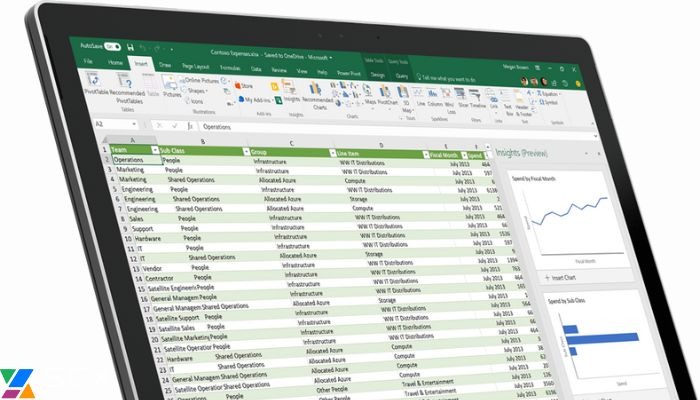
Spreadsheet operations involve using tools like Excel or Google Sheets to manage, track, and process business data. They act as a central hub for storing information, running calculations, and sharing updates, requiring minimal technical training and setup.
Common uses include:
- Inventory tracking
- Order management
- Vendor coordination
- Reporting
Teams update stock levels, log orders, and maintain vendor details manually, while forecasts rely on formulas pulling data from multiple sheets. Spreadsheets are popular because they are familiar, affordable, and immediately usable without IT support.
Spreadsheets work well for small teams and low-volume data, but start to break as operations scale. Multiple users, growing data, and the need for real-time accuracy increase errors, create version conflicts, and slow down decision-making. This hidden friction is often overlooked until it impacts overall performance.
Understanding Automated Workflows

Automated workflows are processes where software handles repetitive tasks according to predefined rules, reducing or eliminating the need for human intervention. They move data, trigger actions, and enforce approvals without manual effort, ensuring tasks flow smoothly from start to finish.
Automation removes repetitive human tasks like copying data, sending reminders, or updating records. Teams no longer spend hours on manual steps, freeing up time for higher-value work such as analysis, planning, and decision-making.
Automated workflows also enable real-time data syncing across systems. Unlike spreadsheets or emails, updates are instantly reflected everywhere, keeping all teams on the same page. Rule-based processing ensures consistency, relying on logic rather than human memory, which drastically reduces errors and delays in operations.
Pros and Cons of Manual and Automated Workflows
Understanding the strengths and weaknesses of manual and automated workflows helps businesses decide which processes to keep, improve, or replace. Both approaches have advantages in certain contexts, but their limitations can create hidden costs if not managed properly.
Manual Workflows
Pros
- Familiar tools that most teams already know how to use
- Low upfront cost with no complex setup
- Flexible for small tasks or short-term needs
Cons
- High risk of human error and data inconsistency
- Slow and inefficient as volume increases
- Limited visibility and delayed reporting
- Hidden productivity costs from rework and manual effort
Automated Workflows
Pros
- Consistent and accurate processing with minimal errors
- Scales easily as operations grow
- Real-time visibility across teams and systems
- Frees employees to focus on higher-value work
Cons
- Requires initial investment and setup time
- Teams may need training to adapt to new systems
- Poorly designed automation can amplify mistakes
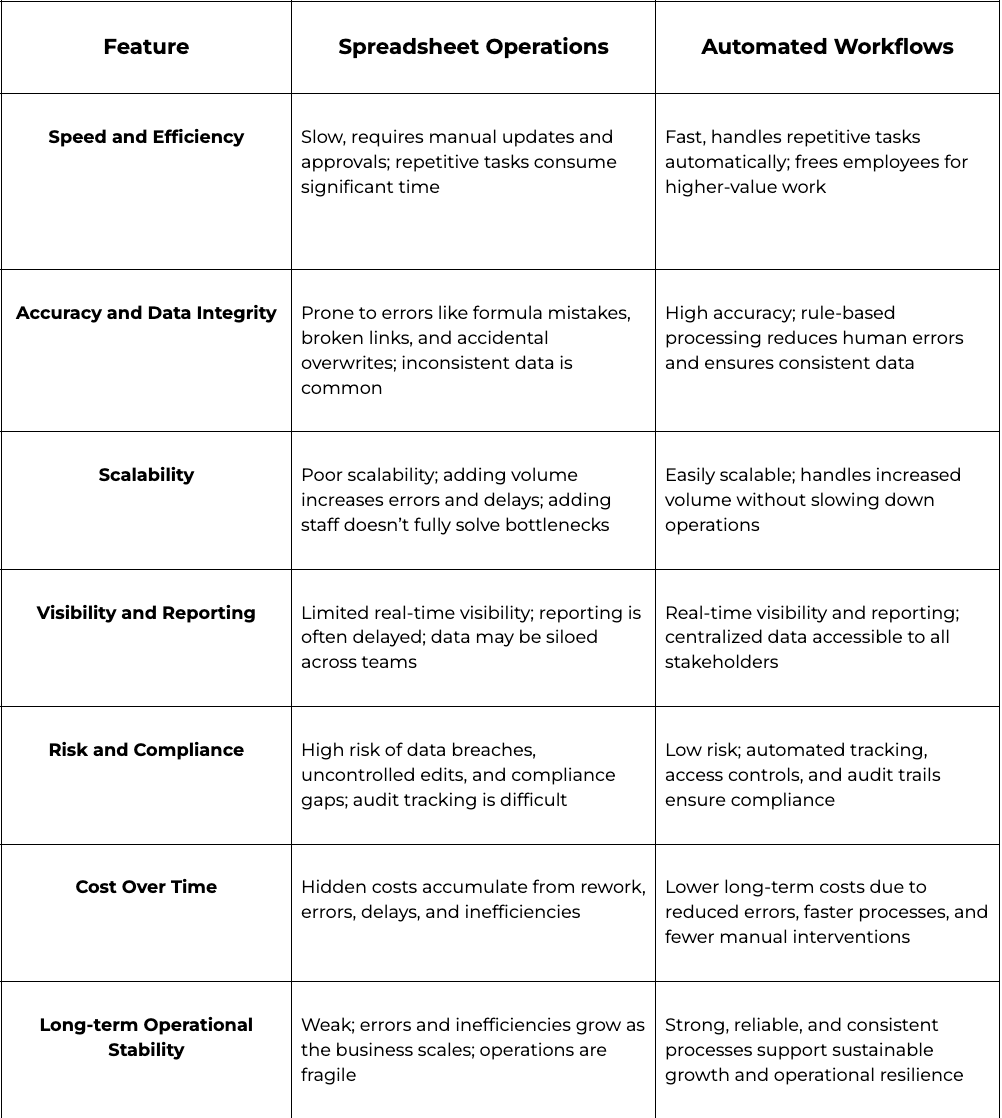
Spreadsheet Operations vs Automated Workflows:
Final Thoughts:
Familiarity with spreadsheets and automated workflows can feel comforting, but it shouldn’t dictate operational decisions. Relying on what’s “easy” today often creates hidden risks and inefficiencies that grow with your business.
Short-term comfort comes from sticking to known tools, but long-term control comes from processes that are accurate, consistent, and scalable. Automated workflows give teams the confidence to manage higher volumes without the constant firefighting that manual systems demand.
Operations teams should regularly evaluate their workflow maturity. Ask whether current processes can handle growth, maintain data integrity, and provide real-time visibility.
Measure your ops tax today to uncover hidden bottlenecks, streamline workflows, and make your operations scalable and reliable.
FAQs
What types of tasks can be automated in a business?
Tasks like data entry, report generation, email communication, and customer follow-ups can all be automated. Workflow automation can also manage documents, project tasks, and approvals, ensuring consistent and smooth operations without relying on manual intervention.
How do you automate business workflows?
Start by identifying repetitive tasks and bottlenecks in your current processes. Choose the workflow automation tool that best fits your systems, integrate it effectively, and continuously monitor performance. Regular optimization ensures maximum efficiency, accuracy, and productivity.
How do automated workflows improve collaboration across teams?
Automated workflows centralize task updates and notifications, ensuring all team members have access to real-time information. This reduces miscommunication, prevents duplicated work, and makes cross-department collaboration faster and more reliable.
When should a business move away from spreadsheets to automation?
A business should consider automation when spreadsheets start causing frequent errors, delays, or inefficiencies, or when transaction volumes grow beyond what manual processes can handle. Signs include repeated rework, poor visibility, and slow decision-making. Transitioning at the right time prevents costly disruptions and supports sustainable growth.